Fifteen recommendations, three people, one record.
RecLink is the screen a service advisor works from once the technician has finished the inspection: what the car needs, what it costs, and what the customer has said yes to. It was also the part of myKaarma most often called confusing. I rebuilt it as a working prototype with recommendations grouped under the customer's own concerns, pre-approved work made visibly different from new findings, and approval, parts and media handled in the same place.
Role
Senior product designer, UX lead
Did
Research, interaction design, coded prototype, test scripts
With
Dealership users, myKaarma CS and product, an AI pair-engineer
A multi-point inspection produces a list of recommendations. The technician records them, the advisor prices and presents them, the parts counter sources whatever gets approved. myKaarma gives each person their own tab, but every tab is a view of the same underlying record. That made the project interesting and dangerous in equal measure: a change that reads correctly on one tab has to stay correct on the other two, and most of the bugs in this story were only visible with two tabs side by side.
RecommendationService advisorPrices the work and presents it to the customer
↔
PartsParts counterSources and prices what was approved, pushes lines to the DMS
↔
MediaTechnicianAttaches the photos and video that make the case
One record underneath. Change the shape of a recommendation anywhere and all three have to agree. You just did that in the estimate above.
What was wrong
A flat list of fifteen things.
The live tool showed every recommendation as its own row with its own price, in the order the technician typed them. The customer's complaint, the diagnosis that answered it and the work that followed were three unrelated lines. Advisors re-explained the connection on every call. Flip the list to see what grouping does to the same nine rows.
Nine rows, nine prices, no sense of which answers what. Pre-approved work looks identical to new findings.
OCR · AMy car is shaking while I drive$1,048
01PREDiagnosis · road test and inspection$390
02CAUTIONCabin air filter$68
03FAILFour-wheel balance and road-force check$390
04FAILRear brake pads and rotors$612
05CAUTIONRight front CV axle boot$268
OCR · BSmell when the AC is on$213
06CAUTIONEvaporator clean$145
OCR · CGrinding when braking$766
07PREBrake inspection$89
08CAUTIONBrake fluid flush$65
09CAUTIONFound, not yet written up—
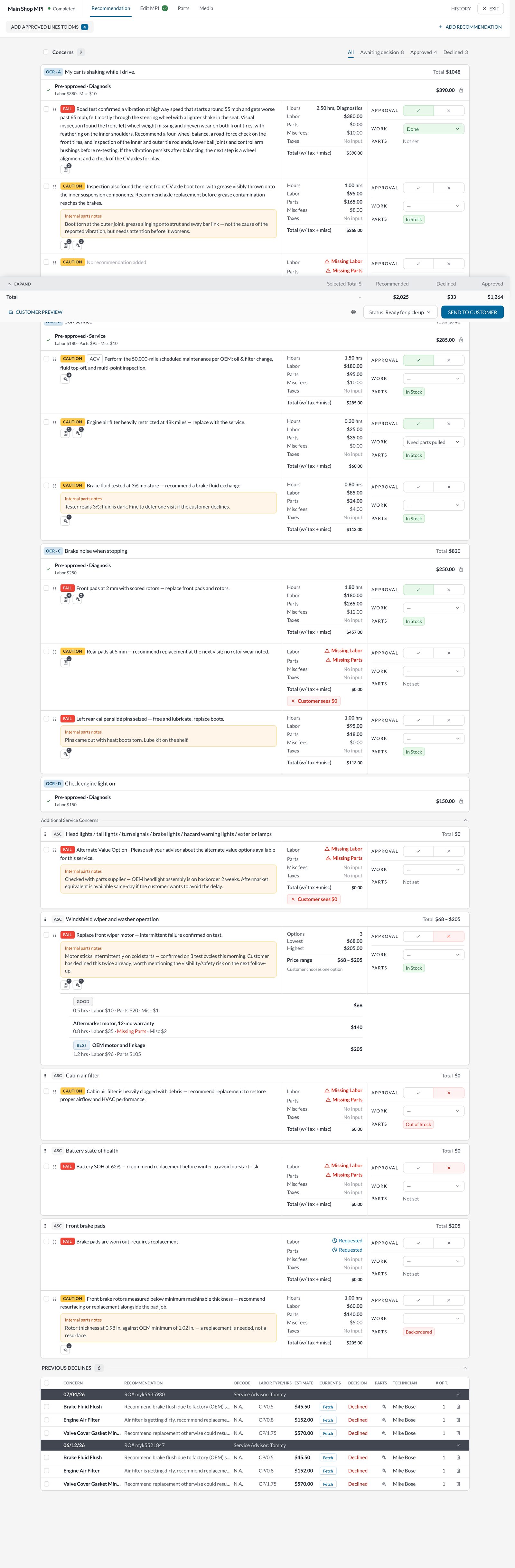
The real prototype, the whole tab. Scroll inside the frame. Concerns at the top, totals pinned to the bottom, Customer preview one click away.
02
What I decided
Five decisions, and what each one fixed.
Each change below traces one idea through every place the data already lived. The pattern repeats: a first pass that looked right on one tab, caught by comparison with another. I have written them the way I committed them.
decision/01 · structure
Group by concern, not by line.
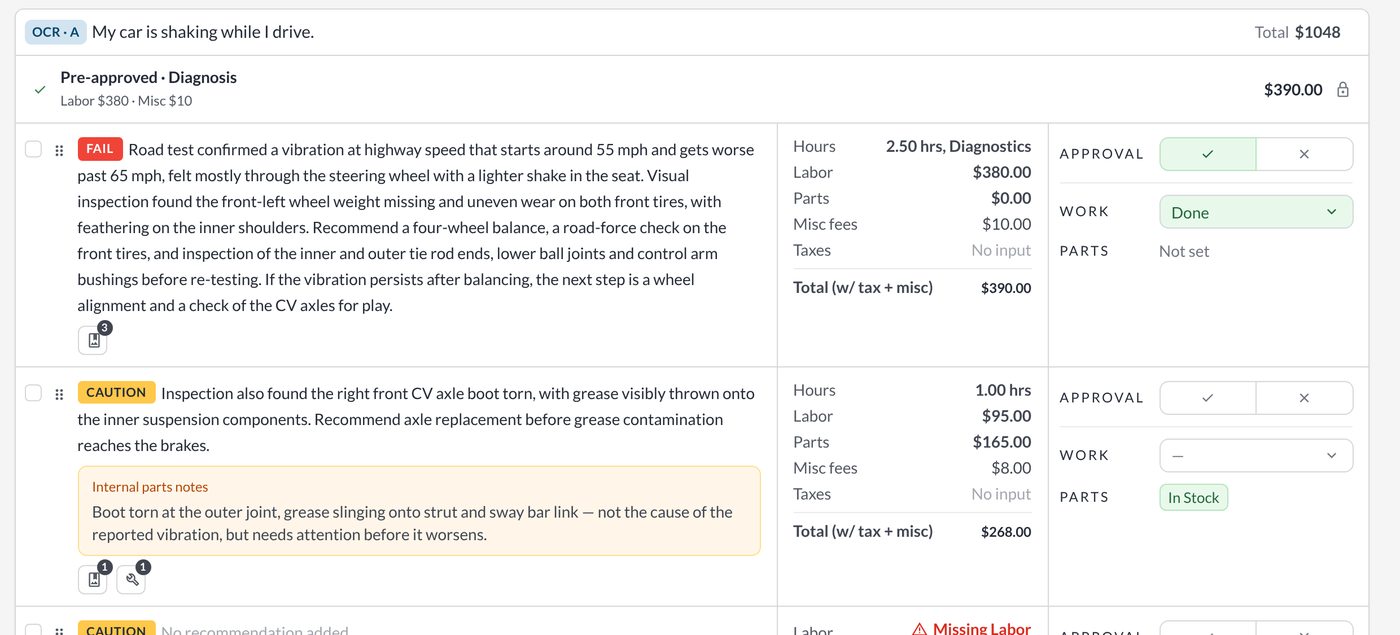
Every recommendation now sits under the concern the customer came in with. "My car is shaking while I drive" is the card; the pre-approved diagnosis, the road-test finding and the CV boot the tech noticed along the way are its contents. The card carries the total, so the advisor can say "the shaking is $1,048 to fix" before going line by line.
The tabs stayed. All, Awaiting decision, Approved and Declined filter the same cards rather than rebuilding the list, so the shape of the page never changes under the advisor's hands.
A concern can also hold no recommendation yet, which is how a tech flags something found but not yet written up. The live tool had no way to say "I saw something" without inventing a price.
In pilotInformation architectureDealer interviews
One concern, three lines, one total. The customer's words are the heading.
decision/02 · pre-approved
Already approved looks already approved.
Work the customer agreed to at check-in used to appear as just another recommendation, so advisors re-asked for approval the customer had already given. It now lives in a green band at the top of the concern, labelled with when it was approved, and is counted in the totals as approved rather than recommended.
This was the single most-asked-for change in testing and the one that most changed how advisors talked on the phone: "you've already approved the diagnosis; here's what it found."
On the Parts tab the same line shows "Approved at write-up" so the counter knows it can be sourced immediately. Same field, same colour, two tabs.
In pilotStatus designUsability tests
Parts tab: the same pre-approved line, the same green, with the filter counts the parts counter works from.
decision/03 · approval
Approve or decline in the row.
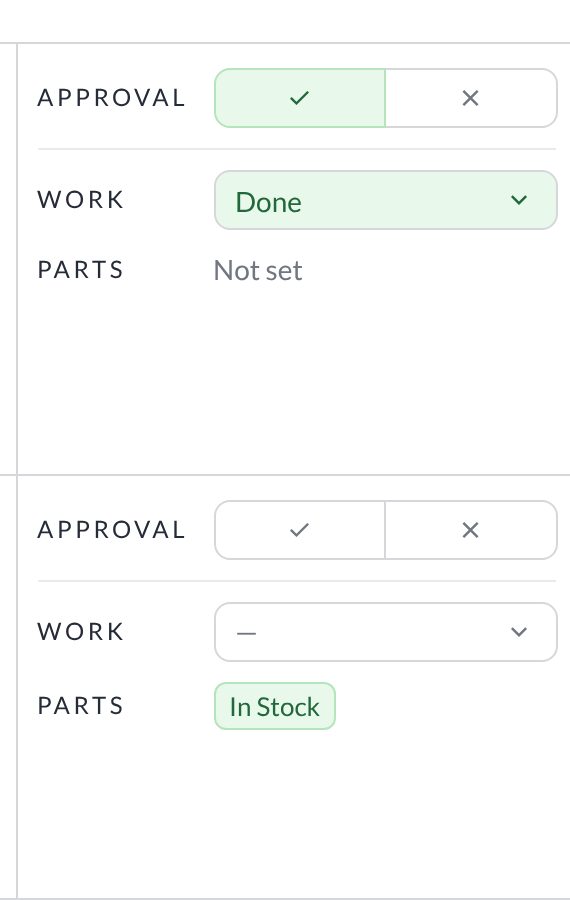
Approval used to be a modal. It is now a tick and a cross on every recommendation, with the work status and the parts status alongside, so the advisor can see at a glance what has been agreed, what is being done and what is still waiting on a part.
The three columns are deliberately the same height as the labour, parts and tax breakdown next to them: approval is read against the money, not in a separate step.
Declined work is kept and totalled rather than hidden. Dealers wanted to see what the customer said no to, for the follow-up call and for the record.
In pilotProgressive disclosureSupport tickets
Approval, work, parts. Three questions, one glance.Recommended, declined and approved stay visible at the bottom of the tab.
decision/04 · parts
Parts with the status of the push.
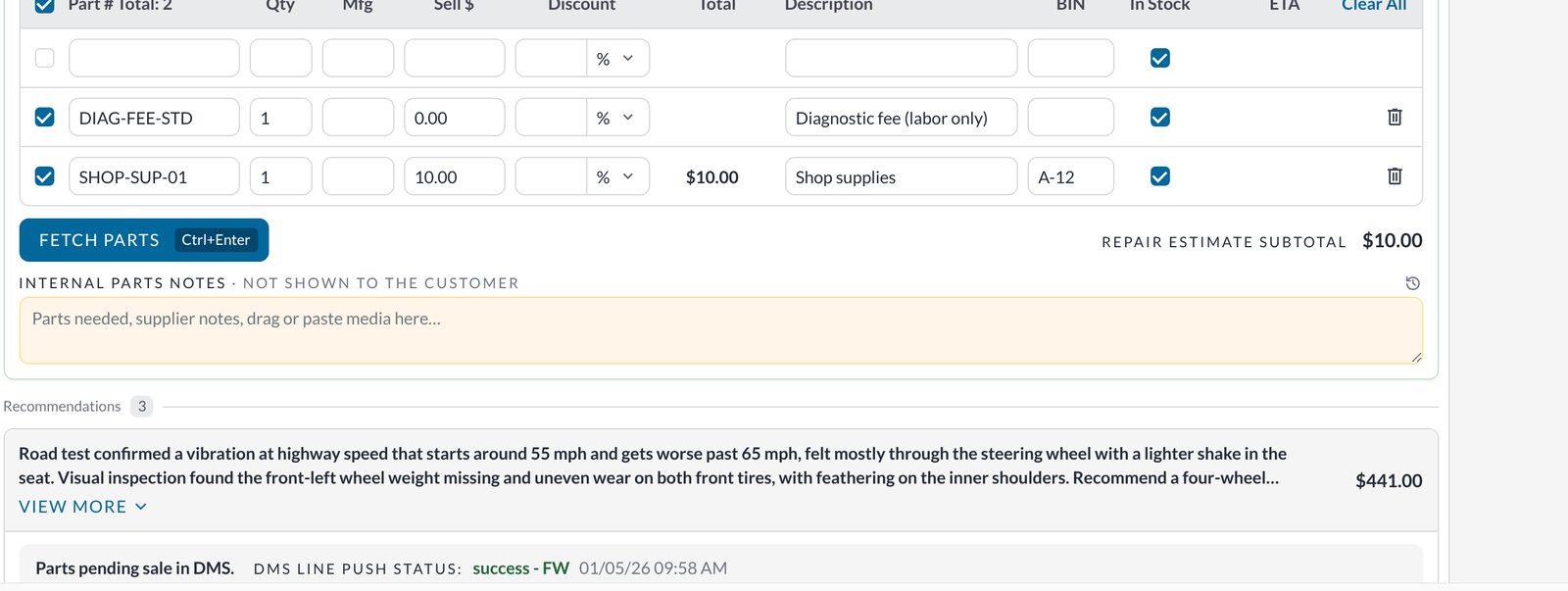
The parts counter needs three things per line: is it in stock, has it been sent to the dealer management system, did the push succeed. The Parts tab shows all three inline, with the DMS push status and timestamp under each recommendation and one "Mark parts added to DMS" action at the top.
Internal parts notes are a separate yellow field, never shown to the customer. That distinction was invisible in the live tool and had caused at least one awkward conversation.
The table keeps the fields the counter already uses, in the order they use them, and "Fetch parts" is one click with a keyboard shortcut.
In pilotWorkflow designDealership visits
Parts, subtotal, internal notes. The yellow field never reaches the customer.
decision/05 · media
Photos and video per concern.
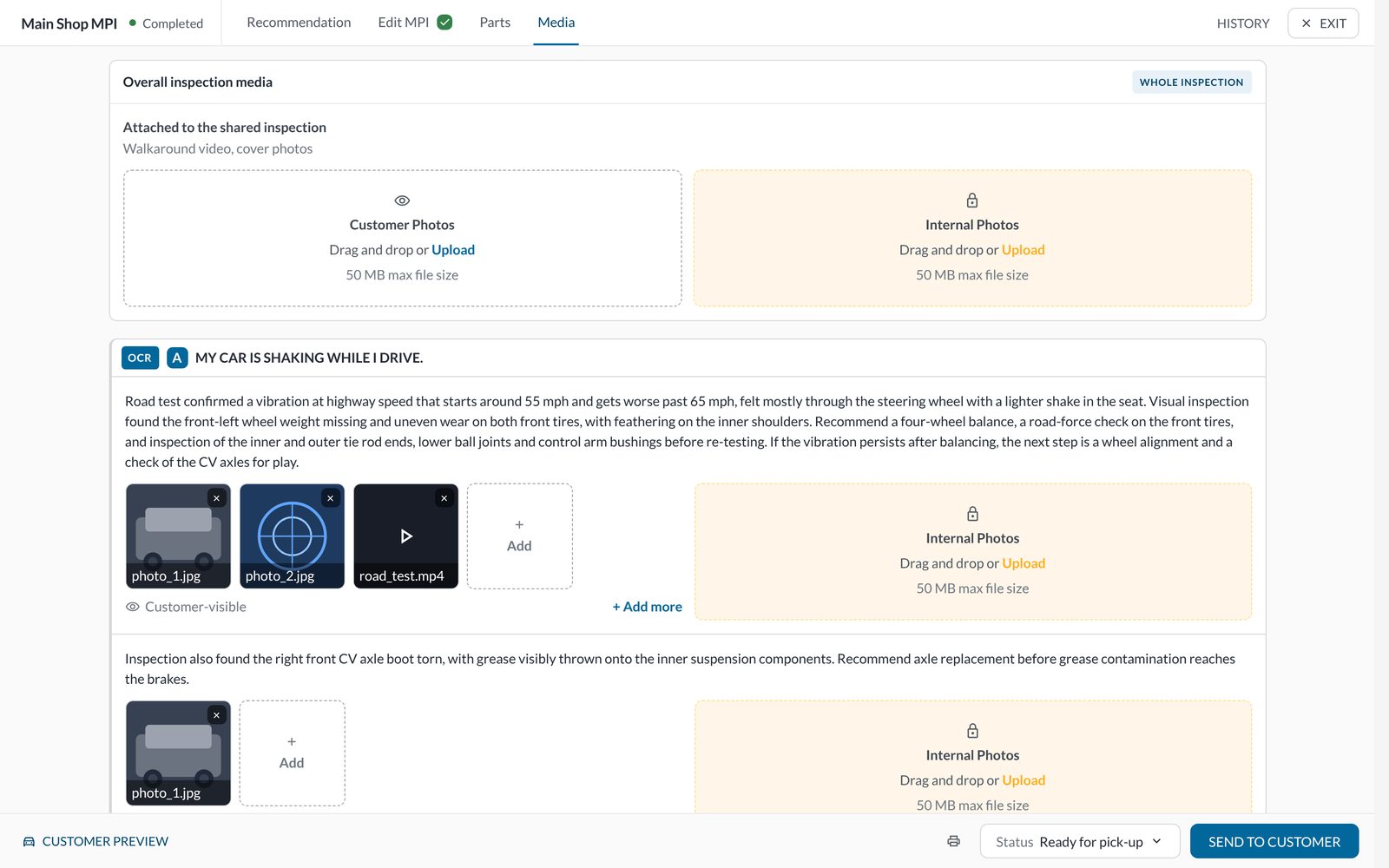
Technicians attach photos and video to make the case for a repair, but the live tool stored them against the whole inspection, so an advisor had to hunt for the picture that went with a specific finding. Media now attaches at two levels: the shared inspection and each concern.
Customer-visible media is separated from internal photos, with the same yellow treatment as internal notes, so nothing a tech shot for the shop's own reference ends up in front of the customer by accident.
In pilotEvidence designTechnician interviews
Inspection-level media, then one block per concern, customer-visible and internal kept apart.
03
How it was built
Feedback in the morning, shipped by the afternoon.
I designed in the live prototype with an AI pair-engineer rather than in static mocks. Every change moved through the same loop: a specific note, often a screenshot with an arrow at the exact pixel, implemented in the running code, verified with a fresh headless screenshot, committed with the reasoning in the message. Dealership feedback from a morning call could be in front of the next tester that afternoon.
1NoteA sentence, or a screenshot with an arrow at the pixel
2ChangeMade in the running prototype, not a mock
3VerifyHeadless browser screenshot, zero console errors
4CommitThe message says why, not just what
100s
of iterations across several directions before the build settled
3
tabs re-rendered and compared after every change
40
browser-driven regression scripts guarding the three tabs
0
console errors tolerated in a shippable state
fix(parts): pre-approved line shows "Approved at write-up" on Parts tab
Why: same field renders green on Recommendation but plain on Parts;
counter re-asked whether the diagnosis could be sourced. One record, one colour.
Verified: rec + parts + media screenshots, 0 console errors, 40/40 scripts.
The prototype was later re-skinned onto myKaarma's design system (the grey ladder, the single teal-blue primary, Lato) so that what testers saw was what engineering would build. Nothing in the structure changed in that pass; that was the point of settling the structure first.
04
What the customer sees
The same structure, in the customer's hand.
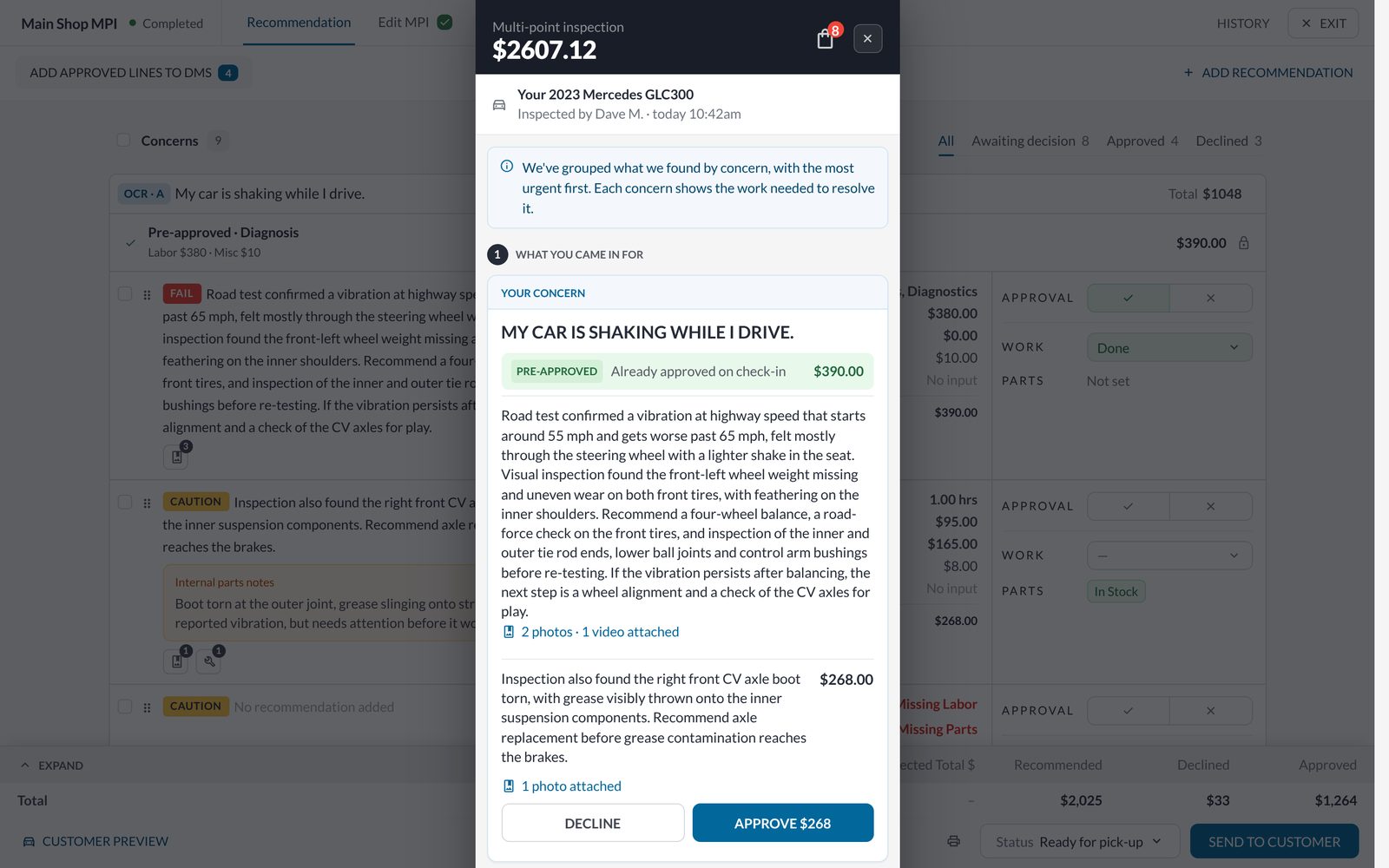
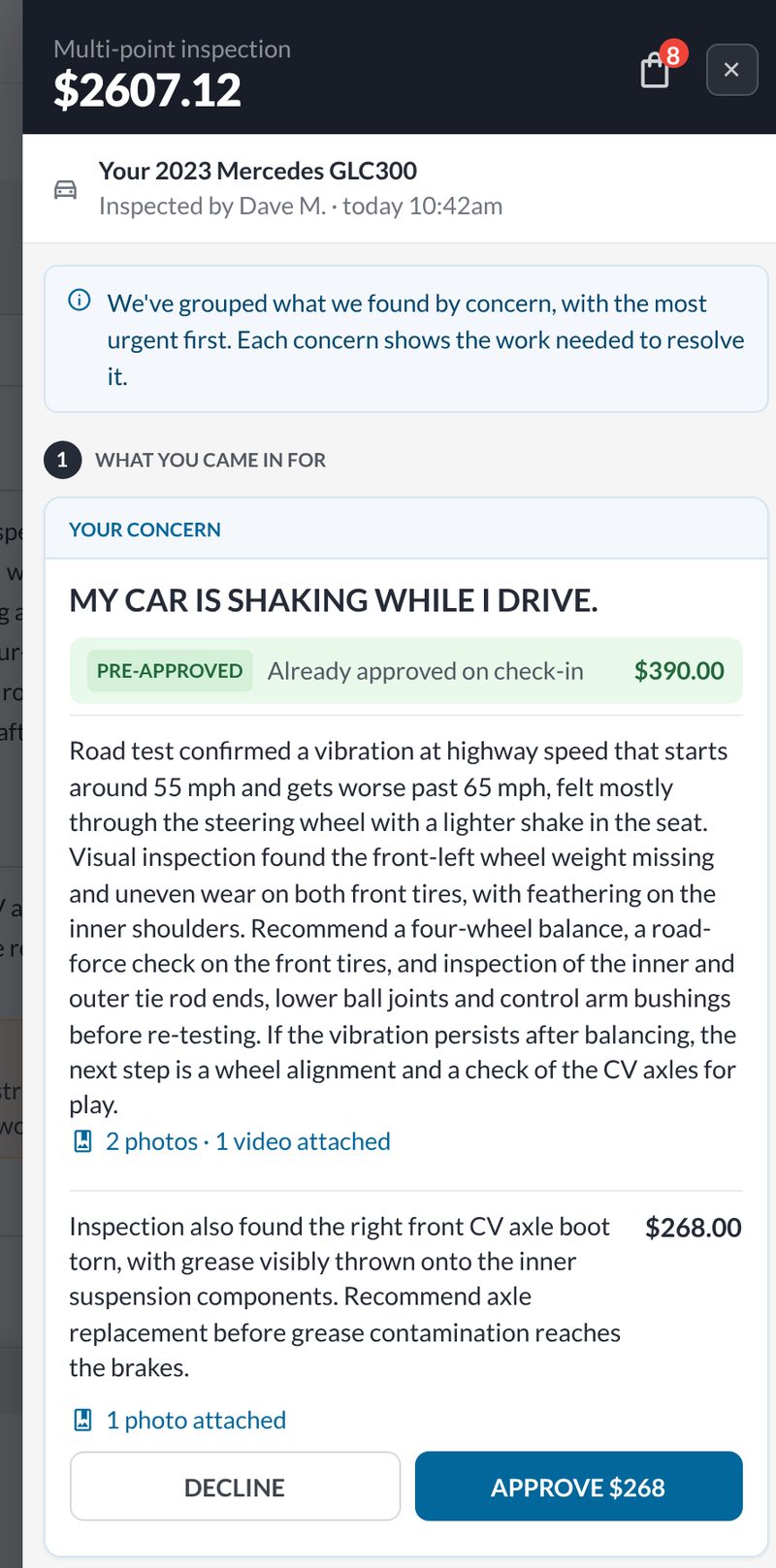
The customer preview is the advisor's check before sending. It mirrors the concern structure exactly: the customer's own complaint as the heading, the pre-approved diagnosis marked as already approved, the findings underneath with their photos and video counts, and Decline or Approve per line. Because it reads from the same record, nothing has to be re-entered or re-ordered. If the advisor regroups a recommendation, the customer sees the regrouping. That was the whole argument for building the structure once, underneath, rather than per tab.
Preview opens over the tab so the advisor can compare what they see with what the customer will.The customer's version: one concern, what was already approved, what is new, and the decision.
05
Where it is
In pilot. Here is what we know so far.
RecLink has not launched, so there is no conversion or time-saved number to report and I am not going to invent one. What there is: a working prototype that eight dealerships and five internal users have been through in usability sessions, a regression suite that keeps the three tabs honest, and a launch plan with the measurements already decided. One test group had a poor session; their dealership had been through onboarding and a tool change the same month, and the result did not repeat with other groups, so I have reported it rather than read it as a verdict.
All 5Shipped 1Asked for 2Tested 1Waiting on launch 1
Shipped as
Working prototypeConcern grouping, pre-approved status, inline approval, parts with DMS status and per-concern media, across three tabs, with 40 regression scripts guarding them.
In pilot
Dealers
Asked for itSeveral pilot dealerships asked when they could have it; the pre-approved band was the most-mentioned change.
Requested
Internally
"When?"Customer-service staff kept asking when it would go live.
Requested
Test groups
8 + 5Dealerships and internal users in usability sessions; one poor result, not replicated.
Done
At launch
[3 measures]Time from inspection to estimate sent · approval rate on first send · advisor re-explanations per call, from support tickets.
Waiting on launch
Methods: user interviews, usability tests, review of support tickets and dealership visits, Playwright regression on every change. Figures in brackets are the plan; they get replaced when the pilot reports.
06
Differently
What I'd change with hindsight.
I'd have written the cross-tab check before the first feature, not after the first bug. Every defect in this project had the same shape: correct in one tab, wrong in another. A script that opens the same recommendation in all three tabs and diffs what it sees would have caught most of them before a person did.
I'd also have moved the prototype onto myKaarma's design system earlier. Settling the structure in a plain skin was right, but a round of testers reacted to the unfamiliar look before they reacted to the structure, and that cost a session.
And I'd have asked the test group that struggled what else had changed for them that month, before reading their results as a verdict on the screen.
Screens are from the prototype with sample data. The estimate at the top is a demonstration of the structure, not the live product. Figures in brackets are placeholders until the pilot reports.